Shopflix WooCommerce Integration Pro
199,99 €
Lifetime License | One-Time Payment
1 Activation key per quantity
Automatically import and sync Shopflix marketplace orders into WooCommerce via secure webhook integration. Shopflix WooCommerce Integration connects your WooCommerce store to the Shopflix Greek marketplace, automatically receiving and processing orders in real time via webhook.
When a customer places an order on Shopflix, it is instantly created in your WooCommerce dashboard — with full billing details, shipping information, line items, tax calculation, and order status — without any manual intervention.
Key Features:
Webhook Integration
- Receives Shopflix order events (`order.created`, `order.delivered`, `order.canceled`, `order.deliveryFailed`) in real time
- Secure Bearer token authentication — your secret is validated on every incoming request
- Automatic registration probe support — passes Shopflix’s endpoint validation test out of the box
- Idempotency protection — duplicate webhook deliveries are detected and skipped safely
Order Management
- Creates WooCommerce orders automatically from Shopflix payloads
- Updates existing orders on subsequent events (status sync, carrier/tracking refresh)
- Full billing and shipping address mapping, including Greek regional fields
- Invoice vs. receipt detection via `hasInvoice` flag, with configurable meta key and values
- Carrier name and tracking codes stored on the order
- Compatible with both **HPOS** (High Performance Order Storage) and classic post-based orders
Product Matching
- Match Shopflix line items to WooCommerce products by SKU or any custom product meta key
- Configurable Shopflix source field (`merchantSku`, `sku`, `merchantEan`, `id`)
- Net price calculation: strips gross tax before importing, then lets WooCommerce recalculate with its own tax rates
Greek Tax (Article 39) Support
- Detects `sfArticle39Valid` flag on line items
- Applies `zero-rate` WooCommerce tax class to qualifying items
- Stores AADE OTP (`aade_otp`) and identity number (`id_number`) as item meta
- Sets `zero_vat_39a` order meta when any item qualifies
Admin UI
- Tabbed settings page: Webhook, Field Mapping, Status Mapping, License
- Shopflix logo displayed before order numbers in the orders list
- Dedicated Shopflix ID column on the orders list (HPOS + classic)
- Search orders by Shopflix ID from the orders screen
- Sidebar meta box on the edit order page showing Shopflix ID, carrier, and tracking
- Custom `wc-dispatch` order status (“Προς αποστολή”) auto-registered if not present
License System
- Free version includes webhook reception and order creation with default mappings
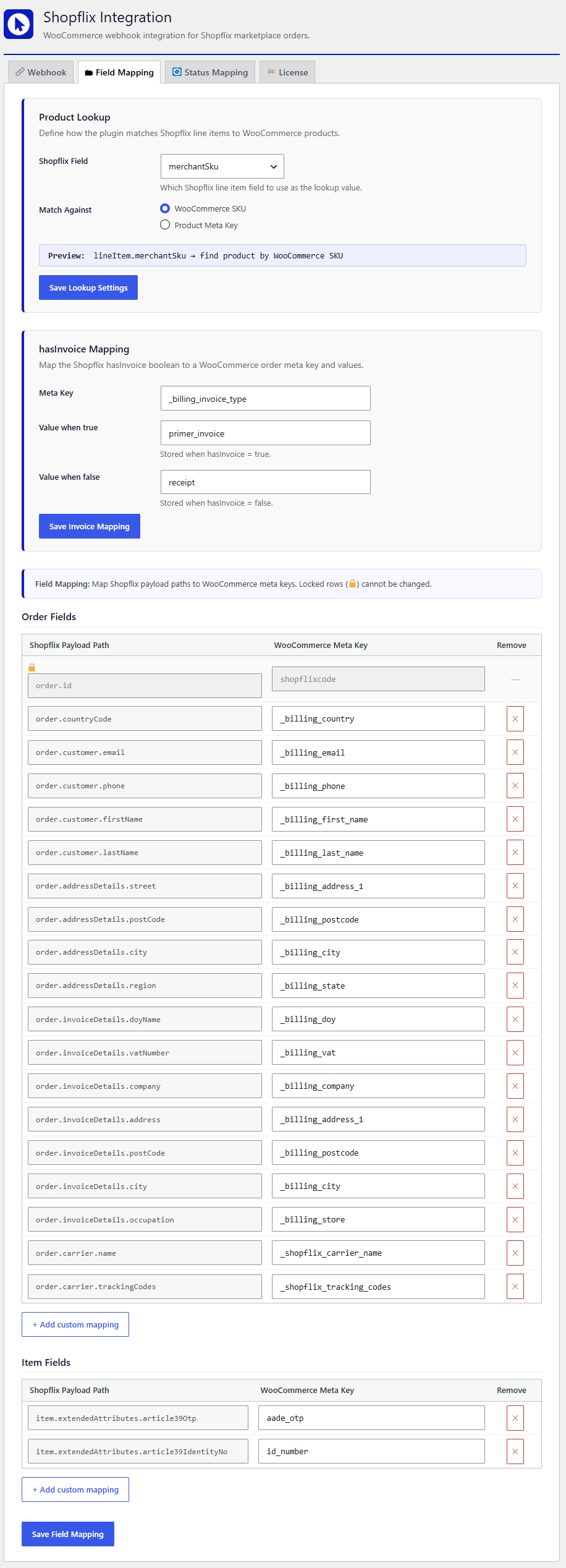
- Premium license unlocks the full Field Mapping tab: custom payload-to-meta mapping, product lookup configuration, and hasInvoice value customization
- License validation checks product ownership and order payment status on every access
- Licenses managed securely via a server-side proxy — no API credentials stored in the plugin
Premium Features (License Required)
- Field Mapping — Map any Shopflix payload path to any WooCommerce order or item meta key
- Product Lookup — Choose which Shopflix field to use for matching (SKU, EAN, ID, or custom) and match against WooCommerce SKU or any product meta key
- HasInvoice Mapping — Customize the meta key and values stored for invoice vs. receipt orders
- Custom Mappings — Add unlimited additional payload-to-meta mappings
Requirements
- WordPress 6.0 or later
- WooCommerce 7.0 or later
- PHP 7.4 or later
- An active Shopflix seller account with webhook access
- HTTPS on your WooCommerce store (required for secure webhook delivery)
About Shopflix
Shopflix is a leading Greek e-commerce marketplace. This plugin is developed independently by Online Developer and is not officially affiliated with Shopflix.
Configuration
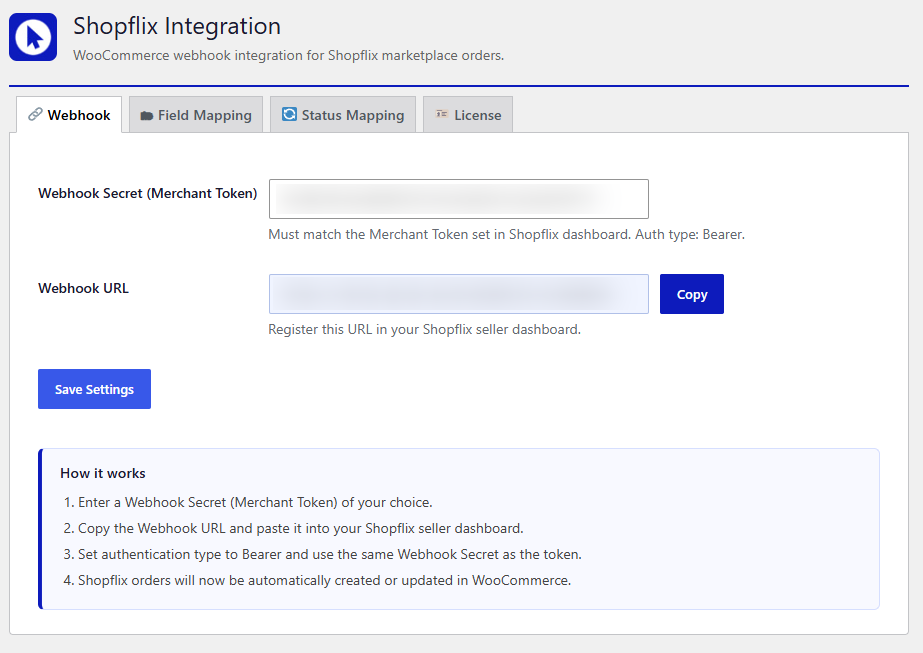
Step 1 — Set up the Webhook Secret
- In your WordPress admin, go to **Shopflix → Webhook** tab.
- Enter a strong, random string in the **Webhook Secret (Merchant Token)** field. You can generate one with: `openssl rand -hex 32`
- Click **Save Settings**.
Step 2 — Register the Webhook in Shopflix
- Copy the **Webhook URL** displayed on the Webhook tab (e.g. `https://yourstore.gr/wp-json/shopflix/v1/webhook`).
- Log in to your [Shopflix Seller Dashboard](https://seller.shopflix.gr).
- Navigate to the webhook settings section.
- Paste the Webhook URL.
- Set **Authentication type** to **Bearer**.
- Paste the same Webhook Secret as the Bearer token.
- Save.
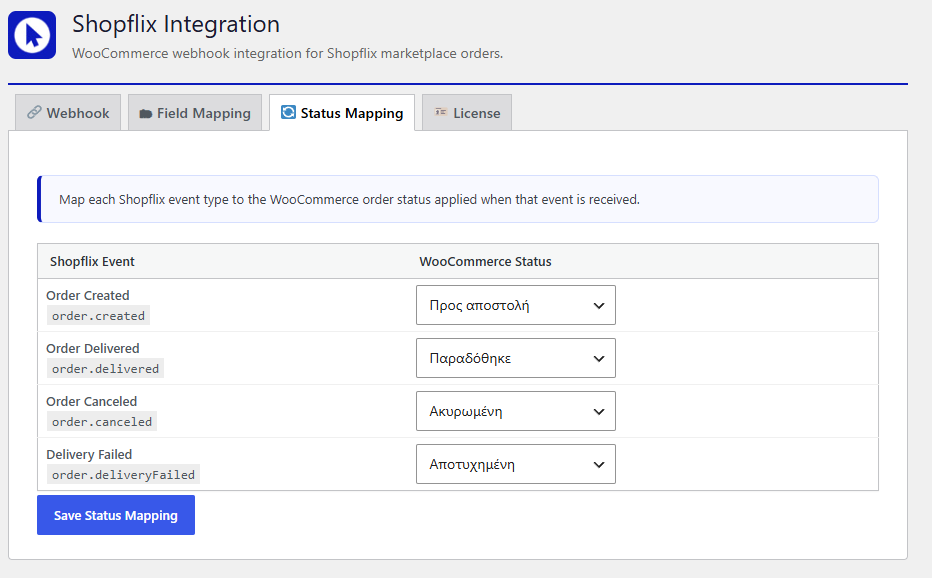
Step 3 — Configure Status Mapping
- Go to **Shopflix → Status Mapping** tab.
- Map each Shopflix event type to the WooCommerce order status of your choice.
- The `order.created` event maps to `dispatch` (Προς αποστολή) by default.
- Click **Save Status Mapping**.
Step 4 — Activate Premium License (optional)
- Purchase a license at [online-developer.gr](https://online-developer.gr/product/shopflix-woocommerce-integration/).
- Go to **Shopflix → License** tab.
- Enter your license key and click **Activate License**.
- Once activated, the **Field Mapping** tab is unlocked.
Step 5 — Configure Field Mapping (Premium)
- Go to **Shopflix → Field Mapping** tab.
- Configure **Product Lookup**: choose which Shopflix field identifies the product and whether to match by WooCommerce SKU or a custom meta key.
- Configure **hasInvoice Mapping**: set the meta key and values for invoice vs. receipt orders.
- Adjust or add any additional field mappings as needed.
- Save each section individually.